
7.5 Set up Campaign
Learn about setting up and best practices for TikTok Ad campaigns.
7.5.1 Spark Ads and Non-Spark Ads
Spark Ads is a native ad format that enables you to leverage organic TikTok posts and their features in your advertising. This unique format lets you publish ads:
- Using your own TikTok account's posts.
- Using organic posts made by other creators
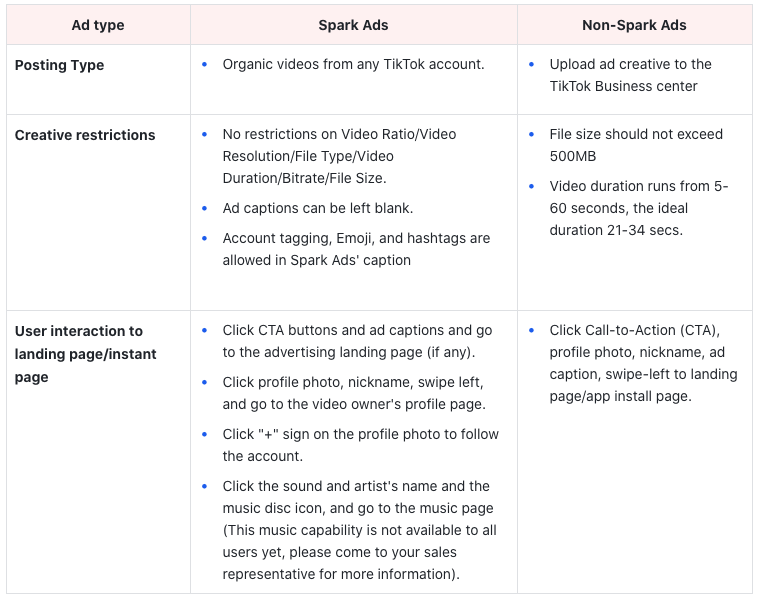
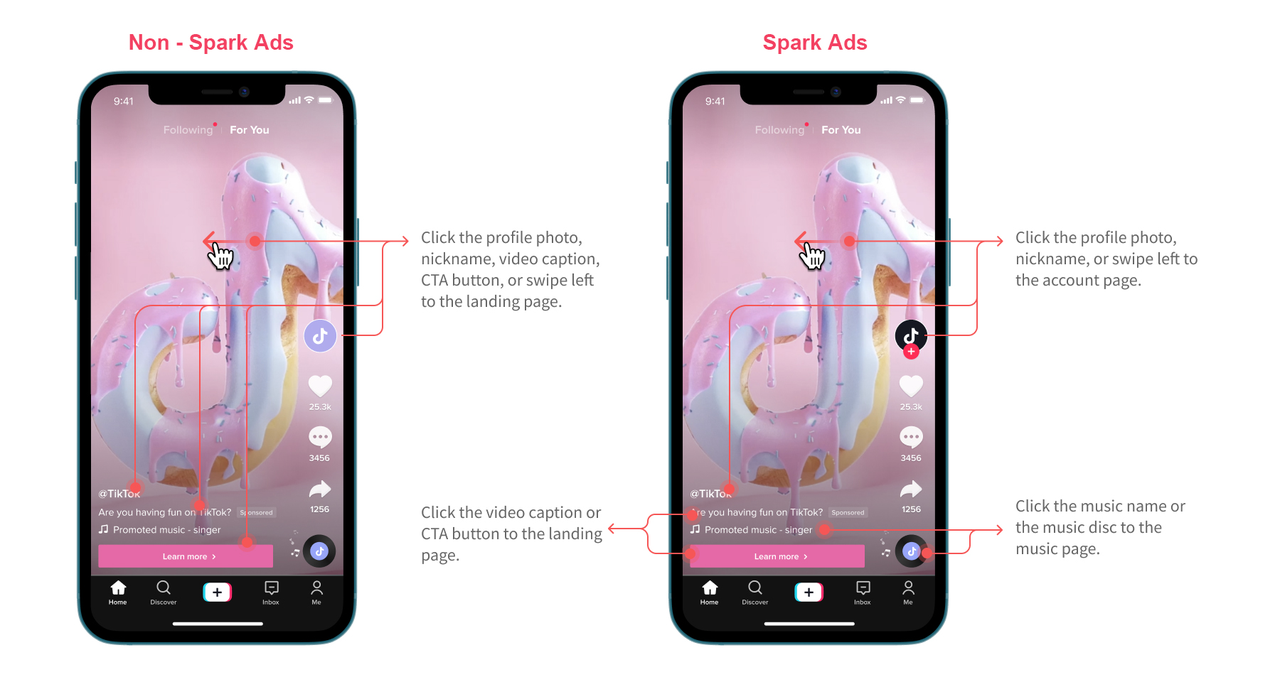
— with their authorization.
7.5.2 Campaign Objective & Structure
TikTok Ads Structure
Ads run on TikTok Ads Manager are structured into 3 parts: Campaigns, Ad Groups, and Ads. Understanding how your campaigns are structured will help you better set up target audiences, allocate your budget and design creative.
About the Campaign Level
The first step to running ads on TikTok Ads Manager is to create a Campaign. Determine your campaign objectives (or goals), which are the final results you want your ads to achieve:
- Select the campaign objective
- Set the budget for the campaign
- Start creating an ad group
You can choose from various objectives like getting more people to install your app (App Install) or driving more people to your site (Traffic). At the campaign level, you will also set your campaign budget, either daily, lifetime, or no limit.
Within each campaign, you will have multiple ad groups, which will enable you to optimize your ads and measure performance.
About the Ad Group Level
You can set specific ad placements, audiences, target audiences, campaign budgets, schedule, optimization goals, and bids for each ad group:
- Choose placements
- Set your target audience
- Set up a campaign budget and schedule
- Set optimization goals and bidding method
- Start creating ads
The ad group level is where a lot of the action takes place and is critical for determining how your ads will run.
About the Ad Level
Ads are the content that you ultimately present to the target audience:
- Name Your Ads
- Select Ad Format
- Enter Ad Details
- Upload your media/creative
- Set your display name and profile image
- Add text, including copy and call-to-action buttons
- Add Tracking
Campaign objective
Your advertising objectives are goals that you want to set and meet so you can help grow your business and engage your audience. In your TikTok Ads Manager account you can select from these three categories of objectives: Awareness, Consideration, and Conversion.
Awareness
Use the Awareness objectives when you want to grow awareness about your product and reach people who are most likely to view your ad and remember it.
- Reach: Show your ads with the maximum number of impressions in your targeted audience at the most efficient price.
Consideration
An objective that gets people to think about your business and seek more information.
- Traffic: Drive people to any URL, such as your website's landing page, a blog post, an app, etc.
- Video Views: Maximize the plays of your video ads from audiences most likely to engage with them.
Community Interaction
- Business Goal: Get more people to engage with your TikTok account by driving followers or increasing traffic to your profile page.
Conversion
Use the Conversion objectives when you want to encourage people to perform an action, such as buying your product or installing your app.
- Product Sales: Sell products from your TikTok Shop, website, and app.
- Website Conversions: Encourage people to take specific actions on your website.
- Lead Generation: Collect leads for your business with a fast-loading, customizable instant form.
- App Promotion: Encourage new people to use your app. Re-engage existing users to take action in your app.
7.5.3 Campaign Budget Optimization
About Campaign Budget Optimization
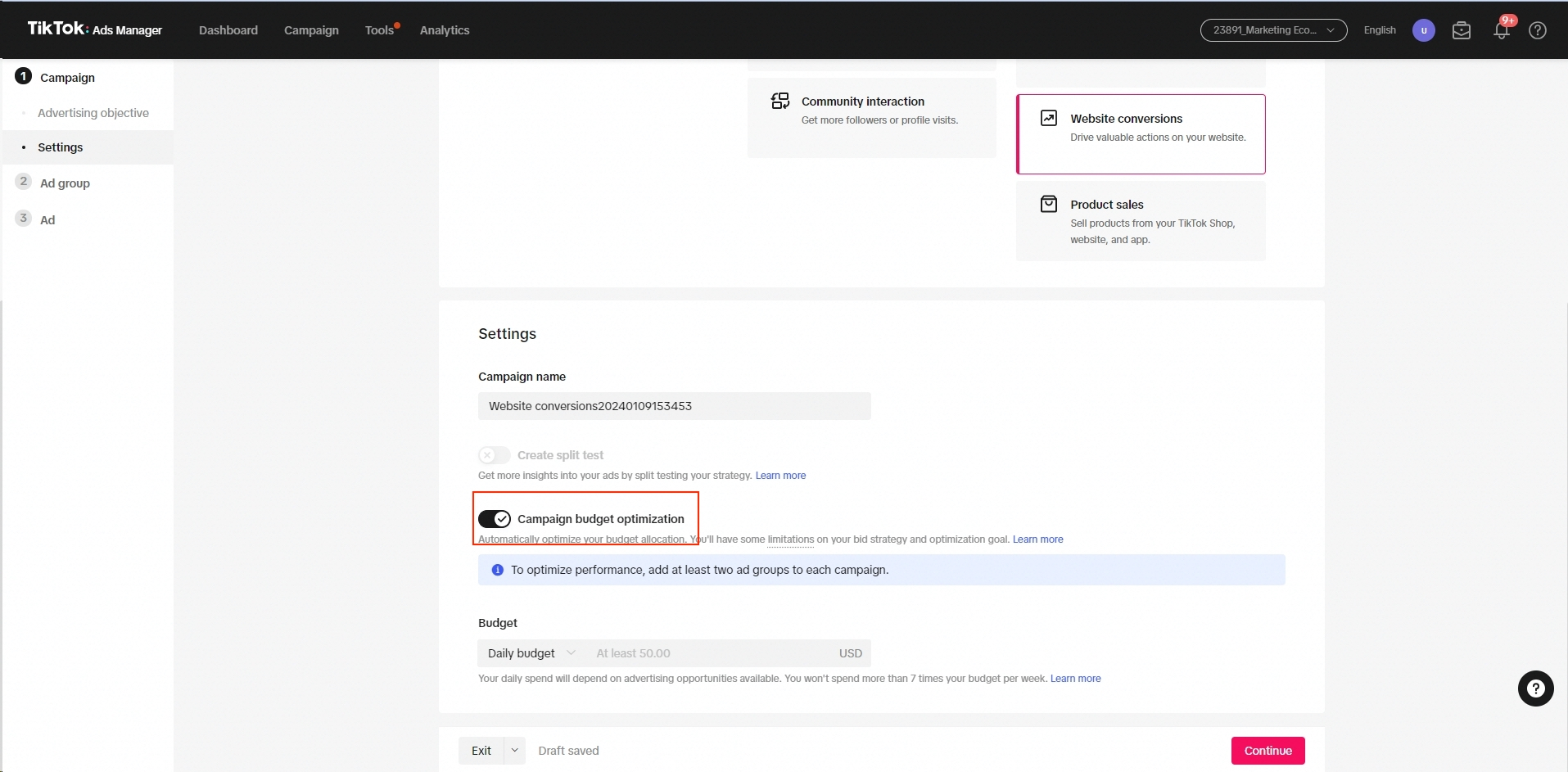
Campaign Budget Optimization (CBO) is a feature that allows you to optimize your budget at the campaign level instead of the ad group. To create a campaign using Campaign Budget Optimization, set up your campaign within the following parameters:
- Advertising Objective: Video View, Traffic, Catalog Sales, Lead Generation, Community Interaction, App Promotion, Website Conversions, and Reach
- Bid Strategy: Maximum Delivery and Cost Cap
- Budget Mode: Daily Budget and Lifetime Budget
- Delivery Type: Standard
- Split Test: Not supported
To enable Campaign Budget Optimization:
- Create a new campaign.
- Select a supported Advertising Objective.
- Turn on the Campaign Budget Optimization toggle.
- Select a Budget; all ad groups in this campaign will share this budget.
- Select the Bid Strategy when setting up the first ad group.
- Under Delivery Type, Standard is the only available option.
- Configure the rest of your ad group settings
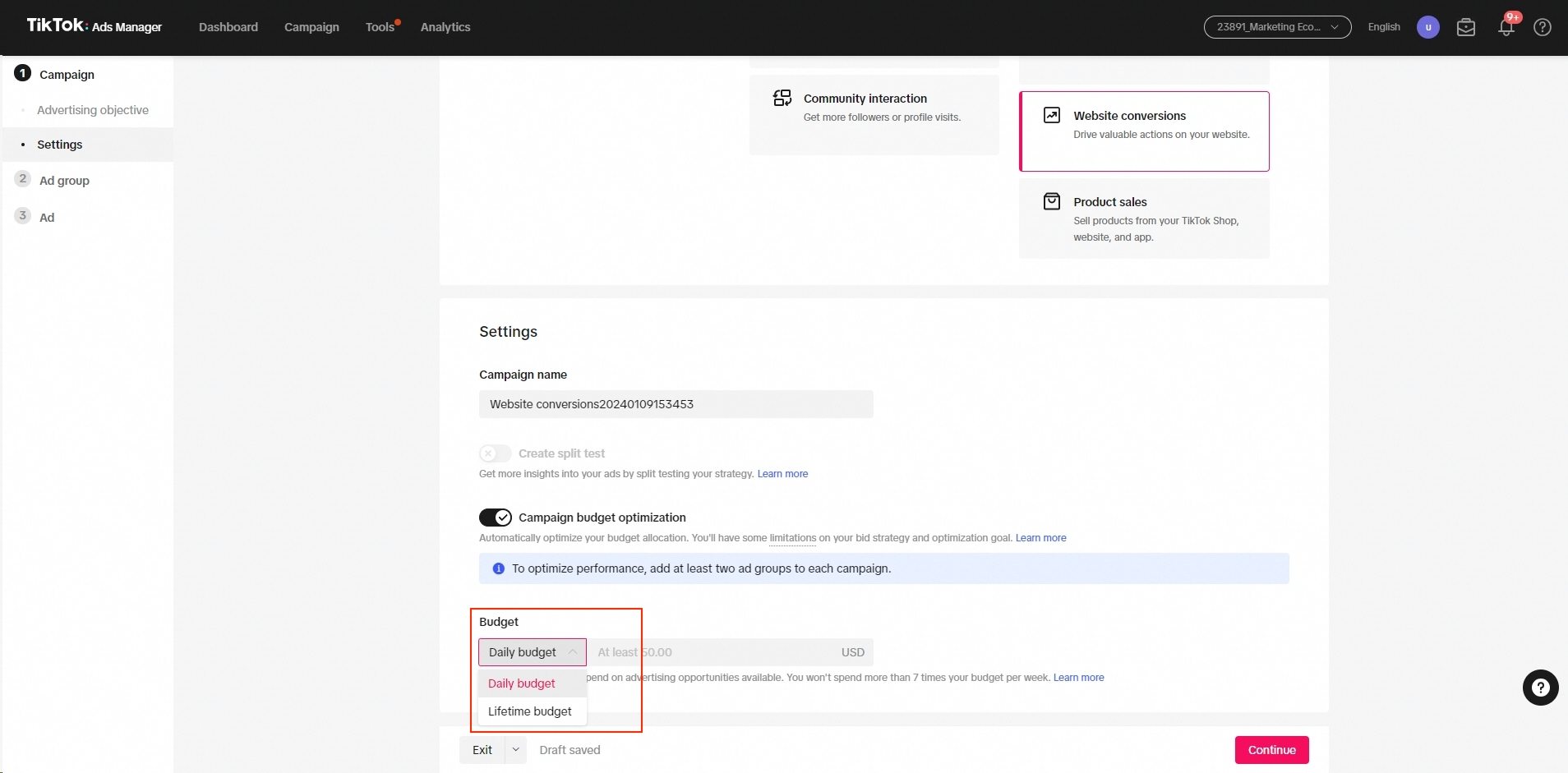
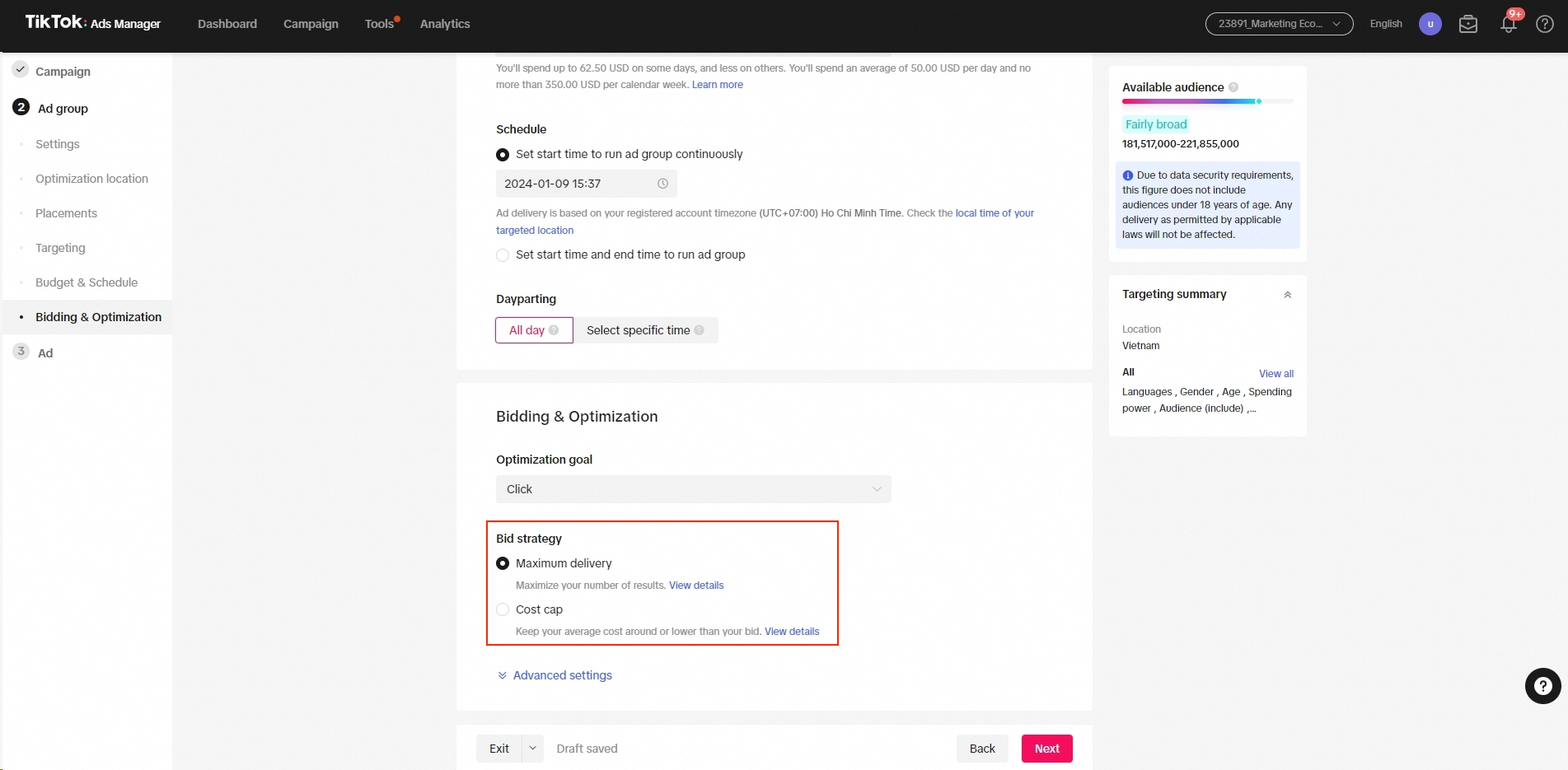
and create your ads. All ad groups should share the same Optimization Goal.
Best practices for campaign budget optimization
Campaign budget
- Set your actual target campaign budget.
- Make sure your ad group budget covers at least 50× target CPA when running App Install.
- Ensure your ad group budget covers at least 20× target CPA while running either AEO or Conversions.
Number of ad groups
- Ensure at least 3–5 unique and active ad groups per campaign, and 2–3 unique creatives per group.
NOTE: CBO does not function when there is only 1 active ad group in the campaign.
Optimizations
- Wait for at least one day and 50 conversions before making new adjustments.
- When adjusting your budget, try to control each adjustment within 30% of the current daily budget.
NOTE: TikTok Ads Manager requires all ad groups within a CBO campaign to apply the same optimization goal.